
CardDAV has no deduplication. The protocol — RFC 6352, published in 2011 — defines how to store and retrieve vCard address books. It has no concept of semantic identity: no merge operation, no duplicate detection, no fuzzy matching. The only identity rule is that each vCard file must have a unique ID within its address book — which says nothing about whether two files represent the same person.
Every layer above the protocol handles duplicates independently, if at all. Apple Contacts has a manual "Look for Duplicates" — local only, doesn't sync back as a merge. DAVx⁵ on Android is a pure sync adapter. Nextcloud's Contacts app has no dedup feature, and its "Recently contacted" feature actively creates duplicates.
Here's why that matters, and what we do differently.
The built-in route: there isn't one
The protocol (RFC 6352):
- No merge method, no duplicate report, no similarity matching.
- UID uniqueness prevents two files from sharing an ID — but the same person can exist as two files with two different UIDs.
- The protocol is silent on duplicates entirely.
Apple Contacts:
- Card → Look for Duplicates → Merge: manual, local scan. Merges modify the local address book — they don't propagate back to the CardDAV server as merge operations.
- No automatic detection or background merging.
DAVx⁵ (Android):
- A pure sync adapter — mirrors server data into Android's contacts provider.
- No deduplication, no matching, no merge.
Nextcloud:
- No server-side dedup in the CardDAV backend.
- The "Recently contacted" (ContactsInteraction) feature creates duplicate contacts when you email someone already in your address book — a known, recurring problem.
- Self-hosted users work around it by disabling that feature, using a single address book, or manual cleanup.
Where it stops
No protocol-level merge exists. There is no standard way to say "these two vCards are the same person, combine them." Each client invents its own approach — or doesn't.
No cross-provider awareness. A CardDAV address book (Nextcloud, Fastmail, etc.) has no knowledge of the same person's record in Google or Outlook. The duplicate persists across providers.
Manual and fragmented. Self-hosted users clean up duplicates client by client, tool by tool, with no unified view of their contacts across all providers.
What ContactZapp does differently
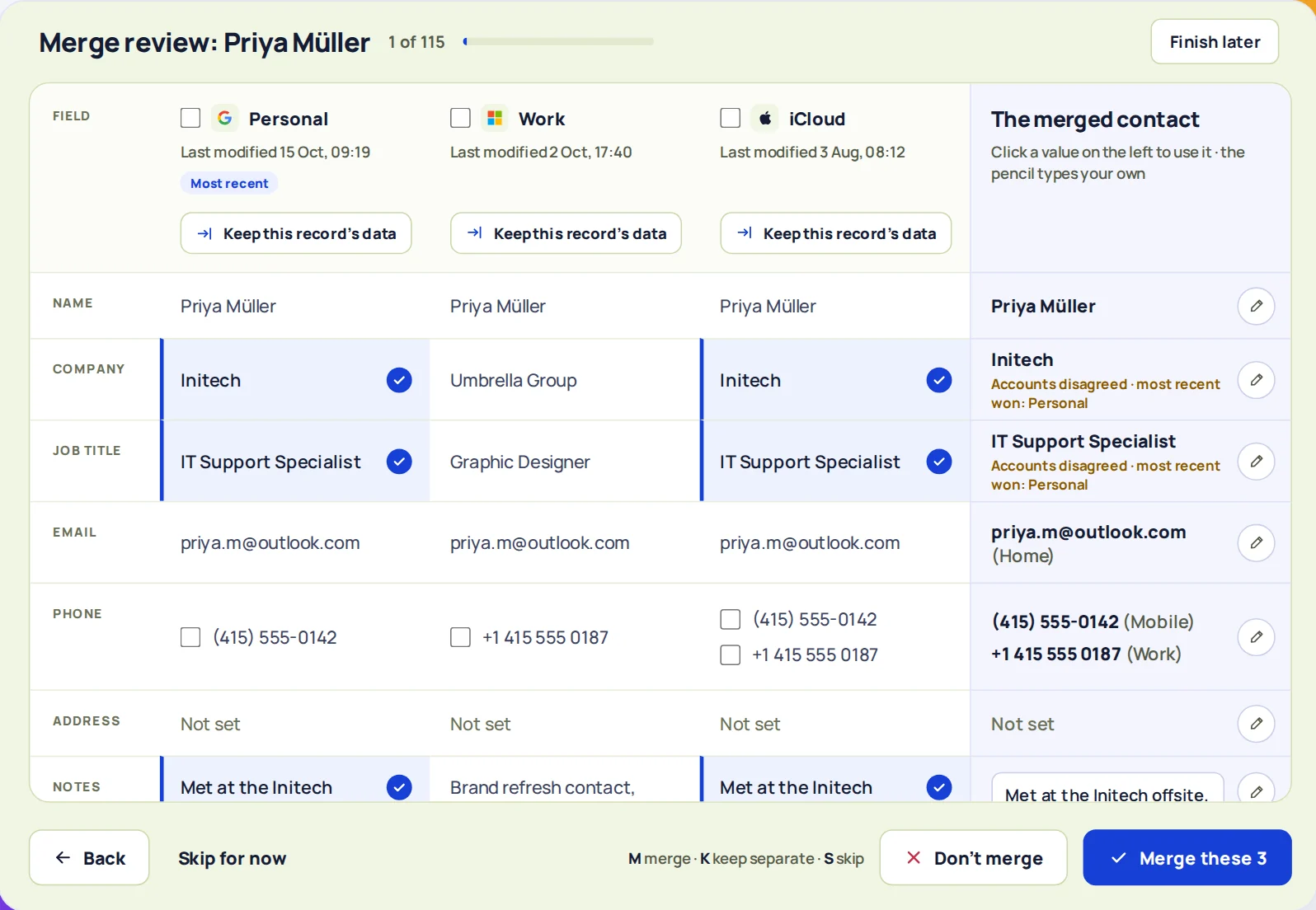
ContactZapp is the only layer that sees across all your providers at once — including CardDAV address books — and merges at the provider.
Cross-provider, including CardDAV. The same person in your Nextcloud CardDAV book and in Google is one match. You review it once, merge it, and the merge is written back to both providers. The CardDAV server gets a real update — not a local-only merge that disappears on the next sync.
Fuzzy matching. The matching engine uses name similarity, normalized email addresses, and E.164 phone numbers. "Jan Kowalski" in Nextcloud and "J. Kowalski" in Google with the same phone number? Found.
Field-by-field review. For each field, you choose what survives. Two different phone numbers? Keep both. A work email and a personal email? Keep both.
No new duplicates from "recently contacted." Because ContactZapp merges at the provider and keeps records in sync, the duplicate-creating behavior of features like Nextcloud's ContactsInteraction is caught and resolved — not left to accumulate.
How ContactZapp works
When you connect your accounts and run a sync, ContactZapp builds a deduplication screen: every duplicate group, side by side, with each field laid out so you can see what would be merged. You review the matches that need a human eye — and you set the confidence level for the ones that don't.
The auto-merge settings offer three levels:
- Likely — flags anything that looks similar; nothing merges without your review.
- Very likely — merges automatically when the match is strong (shared email or phone plus similar name).
- Certain — merges only when the evidence is overwhelming (exact name plus exact email or phone).
Set the level that suits you. High-confidence merges run automatically after every sync; everything else waits for your review.
Example: You have "Anna Nowak" in your Nextcloud CardDAV book with her work email, and "A. Nowak" in Google with her personal email and the same phone number. CardDAV has no way to connect them. Apple's manual merge (if you even use Apple) is local to your Mac. ContactZapp sees the shared phone number, offers the match, and merges them into one record with both emails — written back to both Nextcloud and Google.
FAQ
Which CardDAV providers does ContactZapp support? Any standard CardDAV server — Nextcloud, Fastmail, and others. If it speaks CardDAV, it connects.
Will merging in ContactZapp affect my CardDAV address book? Yes. Merges are written back to the CardDAV server as real vCard updates.
What if my CardDAV server created duplicates? ContactZapp sees all duplicates across all connected providers and can merge them — including duplicates created by server-side features like Nextcloud's "Recently contacted."
Can I undo a merge? Yes. Every merge can be undone from your change history — the original separate contacts are restored.
Does this work with the free plan? Yes. Connect your accounts and run a sync — the first 100 duplicates are deduplicated at the providers. You can see every duplicate found, including the ones beyond the free limit.